
Peace of mind: Block AI companions from your home Wi-Fi with KeeneticOS
An increasing number of children and teenagers are turning to AI chatbots for personal advice instead of seeking help from real people. Ask your children or teenagers if they have ever chatted to an AI about their homework or asked one for advice on anything.
Add this fact to the mix: Neither AI companies nor governments can accurately predict the type of advice that AI chatbots will give to youngsters. Several specialists have demonstrated that such advice can mislead children and young people into misbehaving and even committing suicide.
AI chatbots generate responses based on statistical calculations and large volumes of text data. However, they do not consider a deep understanding of language or the complex human implications when calculating the answers. AI bots have been described as mere statistical parrots that have read vast amounts of text without understanding anything and simply repeat it back through pattern matching.
There are currently heated discussions among specialists about how to regulate children's access to AI. Several countries are considering implementing age restrictions on AI chat services. This follows shortly after the introduction of restrictions on accessing social media. However, it will certainly be several months or even years before these discussions turn into precise regulations and trustworthy outcomes.
In the meantime, there is a practical solution to give you peace of mind. You can already block “everything AI” at home for your children and young people. This article will explain how to filter your home network with KeeneticOS.
How can you filter out AI companions at home with KeeneticOS?
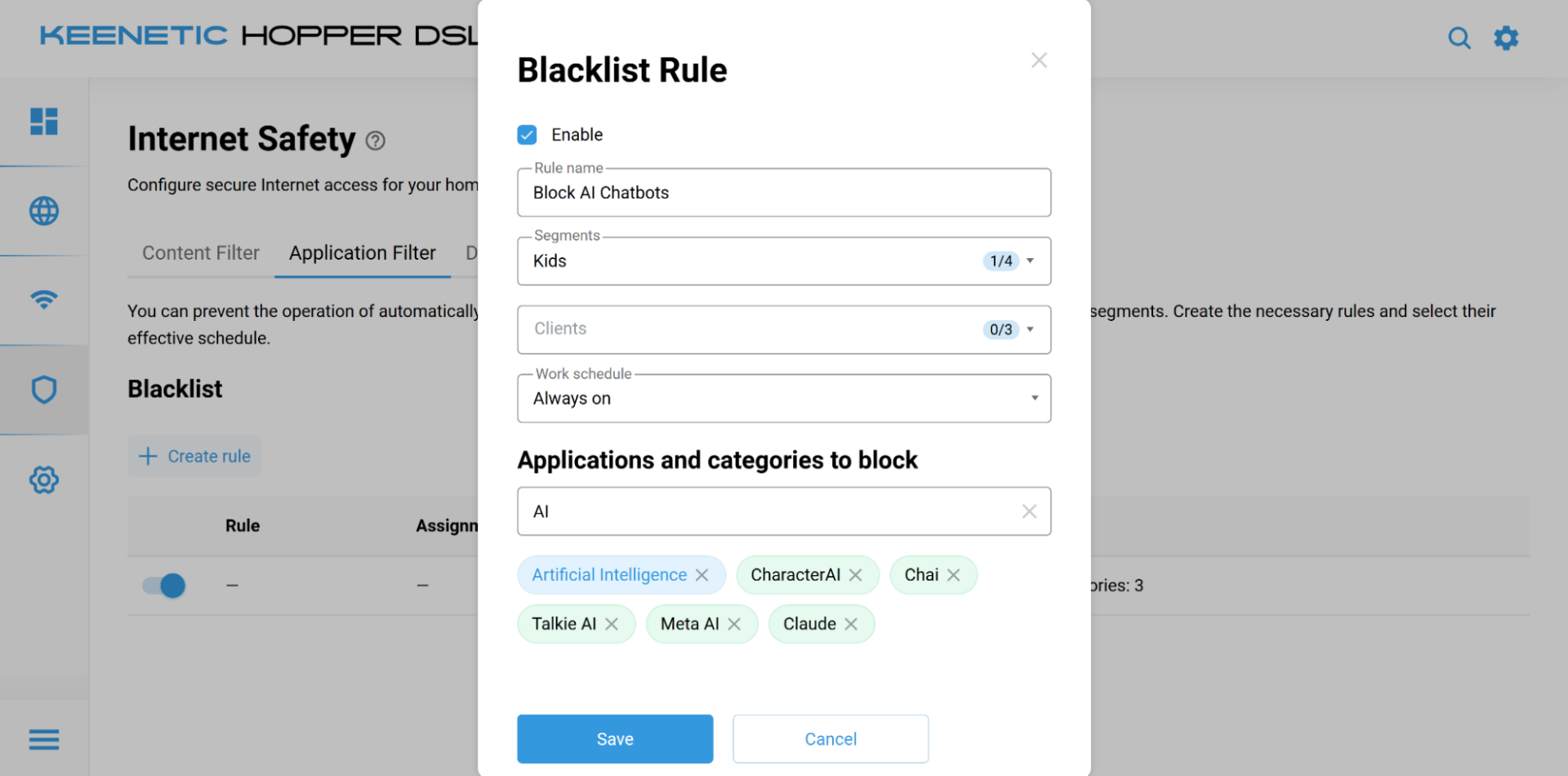
Every Keenetic router — from entry-level devices to the most advanced Wi-Fi7 models — offers the ability to block browsing by destination. Thanks to the embedded DPI (Deep Packet Inspection) engine by Rohde & Schwarz, your Keenetic router can filter out thousands of risky destinations.
With KeeneticOS DPI technology, you can block specific applications or entire categories on particular devices connected to your Wi-Fi. You can even divide your network into segments with different age-group-specific blocking rules. You can also automate the timings for blocking rules using the scheduling options.
You can do all of this using the basic in-device functionality of Keenetic routers, with no need for any extra payments or subscriptions. Once you have purchased your router, you can control which destinations and categories are blocked on your home Wi-Fi network. When new threats emerge, automatic software updates ensure you are protected: the DPI filter parameters get updated too.
KeeneticOS has included content filtering options for years. Previously, the recommended solution for blocking harmful websites was to use filtered DNS service providers. These services are effective at filtering well-known harmful content, such as pornography, violence and gambling, as well as several other dangerous categories.
However, AI is a relatively new category and is still somewhat in a grey area. For this reason, it is not usually blocked by common DNS filtering services such as Cloudflare, CleanBrowsing and AdGuard DNS. Some paid DNS providers, such as DNSFilter and SafeDNS, allow you to set up specific AI filters, but this incurs a monthly fee.
However, your Keenetic router alone, along with KeeneticOS, offers unique DPI (Deep Packet Inspection)-powered filtering. Your Keenetic can filter out thousands of risky destinations. No service fees. No hidden costs. Safety first, right away.
But what if you need AI for work, yet don't want your children to access it?
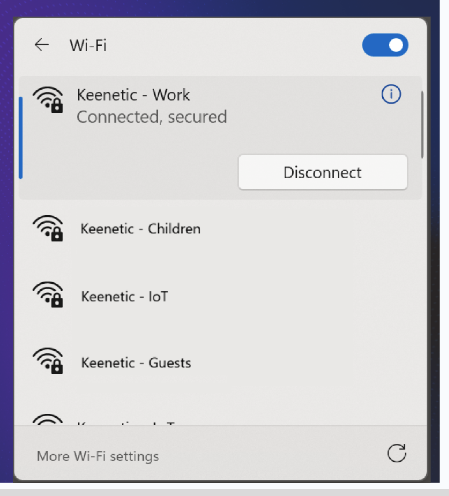
Easy! With KeeneticOS, you can create up to seven network segments and apply specific filtering rules (both DNS- and DPI-based) to each one. For the kids' Wi-Fi, you might want to block AI companions as well as social media. For youngsters over 13, you could allow specific social media apps and block AI companions. As a conscious adult, you could benefit from having no restrictions because you need AI to work efficiently.
KeeneticOS lets you configure up to seven independent Wi-Fi networks, each with a different name, password, and set of filtering rules. All of these networks can be shaped simultaneously, without any additional equipment or expensive subscriptions.
Try Keenetic's DPI-based filters and protect your family from the risks associated with AI companions.